

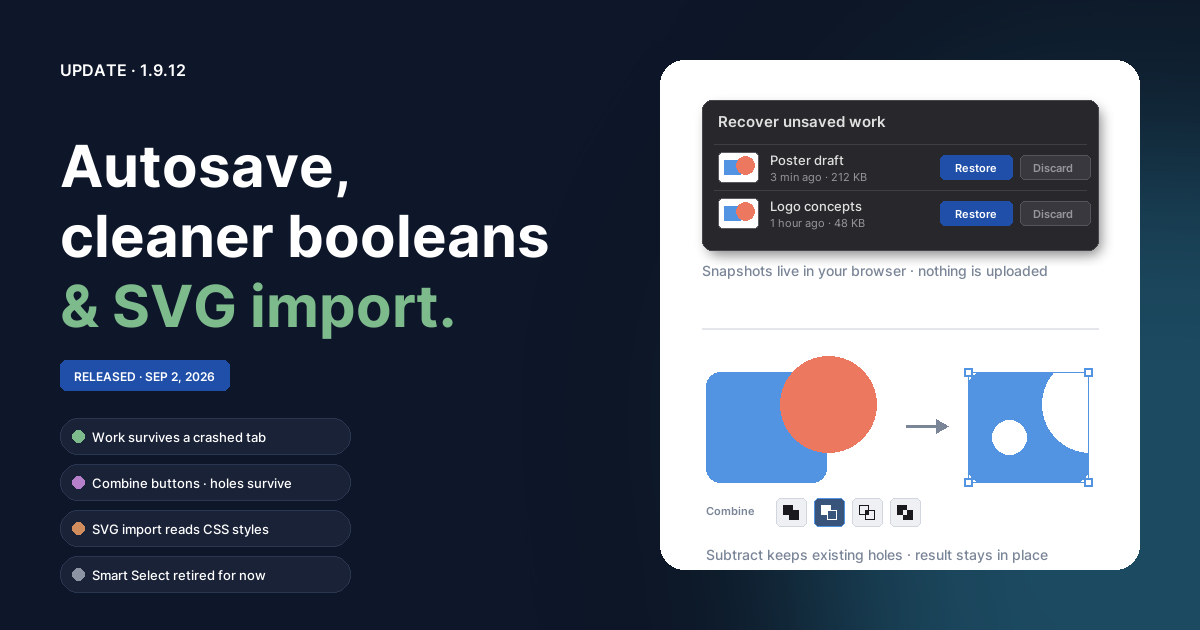
Your work survives a crash
Brushee now keeps a recovery snapshot of every document with unsaved
changes. Snapshots are written a couple of seconds after you stop editing
and stored in your browser's IndexedDB — the exact same gzipped payload a
real .brushee save produces, so restoring one is just a normal open.
- If a tab crashes, the browser discards it, or you close it with unsaved work, the next time you open Brushee a Recover unsaved work dialog lists what it found, with a thumbnail, the document name, and when it was last touched. Restore brings it back as a new tab; Discard takes two clicks so a slip can't delete anything; Later keeps everything for next time.
- A tab that simply reloads reclaims its own documents silently — no dialog, your tabs just come back.
- Snapshots are recovery copies only. Brushee still never writes to a file on disk outside an explicit Save or Save As. They are removed when you save, when you discard them, or automatically after 14 days, and they never leave your machine.
Boolean combine, finished
- With two or more compatible shapes selected, a Combine button group (Union, Subtract, Intersect, Exclude) now appears in the Properties panel next to Alignment. It runs the same code path as Modify → Combine, so undo and the "can't combine that" notice behave identically.
- Holes survive. Compound paths — an SVG letter "O", or the result of an earlier Subtract — keep their hole structure through further combines. Punch a hole, then keep carving the same shape.
- The result now takes over the Layers-panel slot of the front-most shape you combined, instead of jumping to the top of the layer.
- Combine and flatten both respect true document z-order rather than the order you clicked, so "back-most shape wins the style" is predictable after you reorder layers.
SVG import reads your stylesheets
Illustrator, Inkscape, and most design tools export colors as CSS classes
in a <style> block, inherited from parent groups, or via currentColor.
Brushee used to read only presentation attributes, so those shapes came
in as black. Import now resolves paints through the CSS cascade, honors
opacity, and falls back sensibly when a fill points at a gradient or
pattern.
SVG export ships text as outlines
Text objects and text-on-path are exported as real glyph outlines, so
the SVG renders identically everywhere regardless of installed fonts.
If an outline can't be built (an offline font download, for example) the
exporter falls back to a <text> element with a corrected baseline
instead of pushing glyphs above the viewBox. Compound paths export with
the right fill rule so their holes stay holes, and closing segments
return to each subpath's own start rather than drawing a stray curve back
to the first contour.
Text fixes
- Text with a stroke paints the stroke behind the fill again, so thin letterforms keep their interiors intact and the stroke reads as an outer outline — in the canvas, in exports, and in layer thumbnails.
- Copying or duplicating text that carries a glow no longer throws; the cached glow silhouette is rebuilt instead of being reused after a clone.
- Save As stamps the filename you picked into the file, so reopening it shows the right name in its tab.
Smart Select retired for now
The AI-driven Smart Select subtool has been removed while we work on a faster approach — the in-browser model was heavier and slower than we wanted, especially on first use. Magic Wand (with its Fill holes option), Paint Select, Lasso, and Poly Select are unchanged. Removing the bundled model also trims about 36 MB from what the site hosts.