

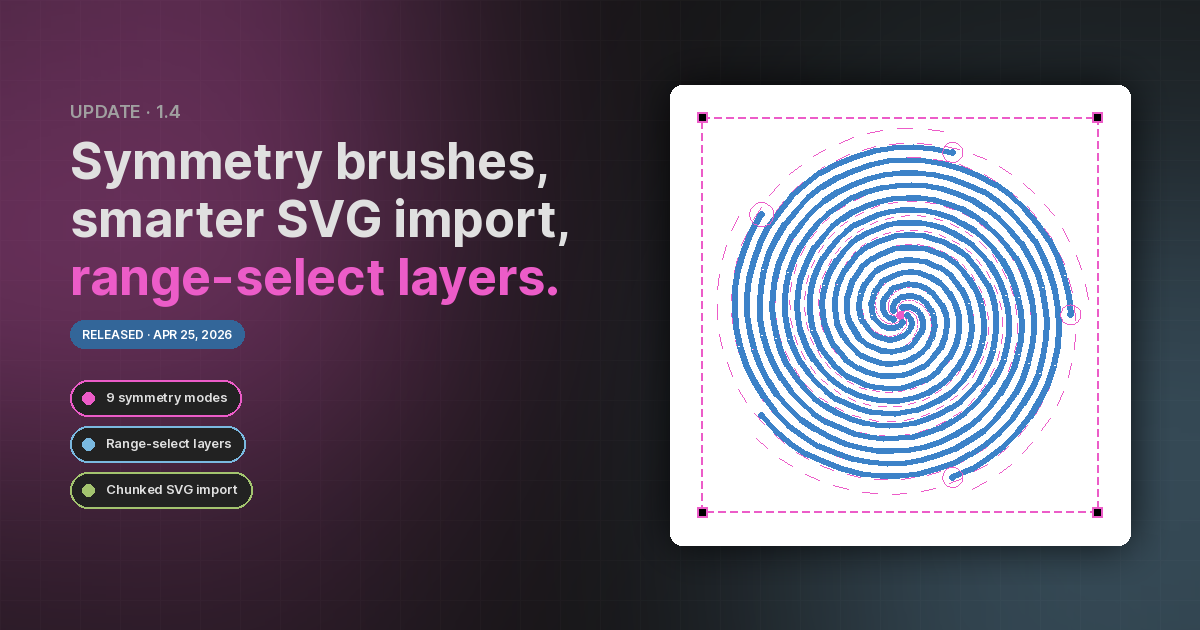
Symmetry brush
The Paint tool has a new Symmetry section in the Properties panel with nine modes that mirror, rotate, and multiply every stroke through a movable on-canvas frame:
- Vertical, Horizontal, Dual Axis, Diagonal — classic reflective symmetry across one or more axes.
- Parallel Lines — N translated parallel copies along the frame's vertical axis.
- Radial — N rotational copies around the frame centre.
- Mandala — radial plus reflective symmetry (2N stamps per dab).
- Circle — paint mirrored across the perimeter of the frame circle. A point at radius r is also stamped at radius 2R − r on the same ray, so inside ↔ outside with the perimeter as the mirror.
- Spiral — N spiral arms wind from the centre outward, with a curvature slider that goes from gentle whorls to tightly-wound multi- turn spirals. With a single arm, the stroke is also mirrored across the arm so paired curves trace either side.
The frame is movable, scalable, and rotatable from the canvas, and the brush cursor previews dashed circles at every echo location so you can see the result before pressing the mouse button. A lock button freezes the frame; a reset button restores it to centred / document-fit / zero rotation.
See the Symmetry Brush guide for the full walk-through.
Layers panel — Shift and Ctrl select
The Layers panel now matches the selection conventions you know from the rest of the desktop:
- Click an object — single select (replaces the current selection and becomes the new anchor).
- Ctrl / ⌘ + click — toggle that object in or out of the selection without disturbing the rest, and set it as the new anchor.
- Shift + click — select the range from the previous anchor to the clicked item, in panel order. Great for grabbing a run of layered shapes in one motion before aligning, distributing, or locking them.
Visibility and lock toggles are unaffected — clicking the eye / lock icon still toggles just that one item without changing selection.
Improved SVG import
Large SVG imports used to freeze the canvas while every shape was sampled. The importer now does the work in chunks and shows a progress overlay so you can see how far along it is — no more blank screen on files with hundreds of paths. Drop / paste / File → Import Image… all use the new pipeline.
Lock fixes
A couple of lock-state holes are sealed up in this build:
- Locked layers protect their items. Objects in a locked layer can no longer be selected, dragged, resized, rotated, or smart-handle- edited via the canvas. Paint and erase also refuse to write into a bitmap on a locked layer.
- Smart shape handles respect the lock. Locking a smart shape (or its layer) hides the yellow diamond handles instead of leaving them draggable.
Misc
- The Reset button in the Symmetry section restores the frame without touching mode/parameters — handy after experimenting.
- Properties panel sliders no longer "stick" mid-drag — slider input no longer triggers a panel re-render.
- Sliders, lock button, and reset button in the Symmetry section share consistent height, padding, and alignment with the rest of the panel.
- The Skew / Stretch / Trapezoid warps on bitmaps now use a per-pixel inverse-bilinear sampler — the dark mesh-edge artifacts from the old triangle-warp pipeline are gone.
- The feedback panel now links straight to a feedback form (in a new tab) after a sentiment ping.